
How to Check NYSC 2026 Senate List [Batch A, B & C]
How to Check NYSC 2026 Senate List [Batch A, B & C]
The NYSC senate list is the official record of graduates approved by their institutions to participate in the NYSC program. It contains your name, matriculation number, date of graduation, and mobilization status.
If your name appears on the portal, you are cleared for NYSC registration. If you see “No Record Found,” it means there is an issue that must be resolved before you can proceed.
This guide explains what the senate list means, how to check it, common errors, and how to fix them without stress.
What Is the NYSC 2026 Senate List [Batch A, B & C]?
Before you can register for service, your school must confirm that you truly graduated and met all academic requirements.
After internal clearance, your institution’s Academic Board approves a list of qualified graduates. That approved document is called the senate list. It is then uploaded to the NYSC portal.
Without your name on this list, you cannot begin NYSC registration or receive a call up number from the National Youth Service Corps.
Why the Senate List Is Important
The senate list connects your school to NYSC. It confirms that:
- You completed your academic program
- You satisfied graduation requirements
- You are eligible for mobilization
It also prevents unqualified individuals from entering the system.
If your name is missing, you cannot register for service.
Who Is Eligible to Be on the Senate List?
To be included, you must:
- Have a Degree or HND certificate
- Have studied in a Nigerian institution
- Be cleared by your school academically and administratively
If you have unresolved results, unpaid fees, or incomplete clearance, your name will not be uploaded.
Who Submits the Senate List?
Each institution prepares the list of eligible graduates. The Academic Board vets and approves it. After approval, the school’s mobilization officer uploads it to NYSC.
NYSC cannot add your name without this official submission from your institution.
How to Check the NYSC 2026 Senate List Online [Batch A, B & C]
Before checking, make sure you have:
- Your matriculation number
- Your institution name
- Your surname exactly as it appears in school records
- Your date of birth
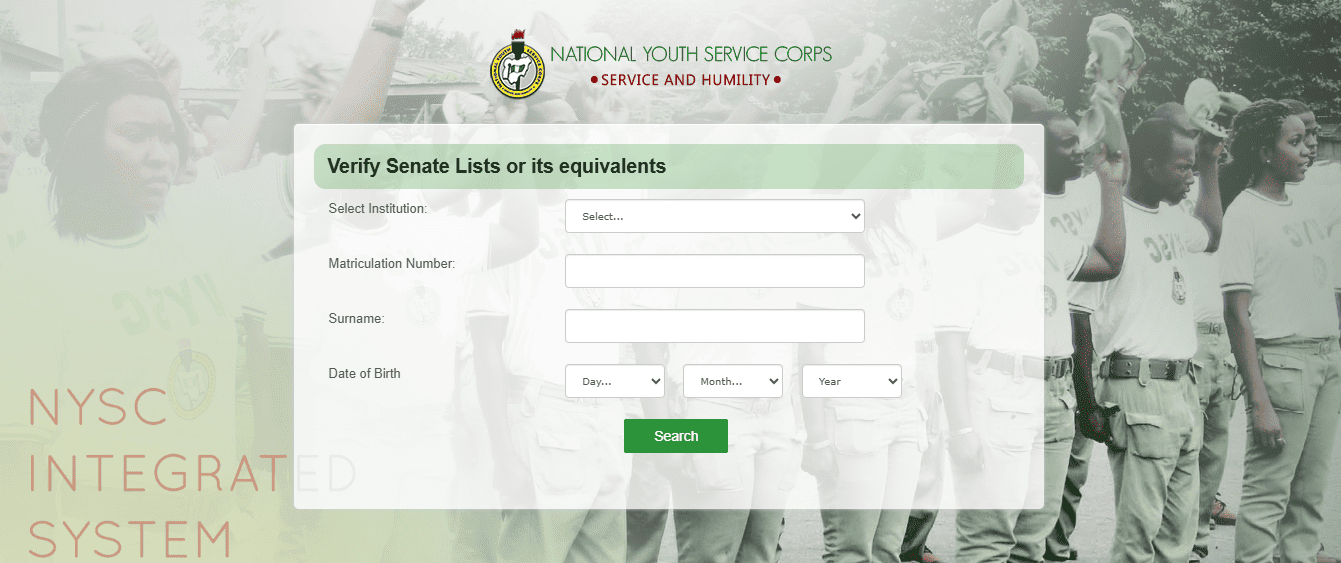
Step by Step Guide
- Visit the official NYSC senate list portal on portal.nysc.org.ng/nysc/VerifySenateLists.aspx
- Select your institution from the drop down menu.
- Enter your matriculation number.
- Enter your surname and date of birth.
- Click Search.
If your details appear, you are approved for mobilization.
If you see “No Record Found,” there may be a problem.
Note: Using the wrong date of birth or leaving out the graduation year does not usually affect the search result as much as entering a wrong surname or matric number.
Why You May See “No Record Found”
This message appears for several reasons:
- Your school has not uploaded the senate list yet
- Your name was not included in the uploaded list
- You entered incorrect details
- Your school compiled the list internally but has not uploaded it
Do not panic. Most of these issues can be resolved.
What to Do If Your Name Is Not on the Senate List
You cannot register for NYSC without your name on the senate list. The issue must be fixed first.
Common reasons for omission include:
- Incomplete school clearance
- Outstanding academic issues
- Errors in your personal details
- Late submission by your institution
How to Fix It
- Visit your school’s mobilization or student affairs office.
- Confirm whether your name was sent to NYSC.
- Clear any outstanding academic or administrative issues.
- Ensure your surname, matric number, and date of birth match school records.
- Wait for the next upload if your school submits names in batches.
If delays cause you to miss your current batch, your name can be included in the next mobilization cycle.
How Long Does It Take for the Senate List to Appear?
The process takes time.
After final clearance:
- Your department forwards records to the registry
- The Academic Board approves the list
- The mobilization office uploads it to NYSC
- NYSC processes and updates the portal
This may take one to three months, depending on your institution and the mobilization schedule.
Delays can happen due to board meeting schedules, technical issues, or late submissions.
Always rely on updates from your school because NYSC cannot upload your name without them.
Common Senate List Errors and How to Fix Them
Even if your name appears, check your details carefully.
Name Spelling Errors
If your name is misspelled:
- Confirm the correct spelling in your school records
- Report the issue to your student affairs office
- Provide supporting documents such as admission letter or statement of result
Your school can correct and re upload it in the next submission. Corrections usually reflect in a later batch.
Your name will only be corrected to match official school records.
Wrong Course of Study
If your course is incorrect:
- Complete online registration
- Apply for course correction on your dashboard
- Inform your Student Affairs Officer
This correction is usually processed quickly and does not require waiting for another batch.
Wrong Date of Graduation
If your graduation date does not match your certificate or statement of result, NYSC may block your registration.
To fix it:
- Report immediately to your Student Affairs Officer
- Request correction before the next mobilization
- Confirm the updated date reflects on the portal
Going to camp with incorrect details can result in being sent home.
Difference Between Senate List and Graduation List
Many graduates confuse these two lists.
Senate List
- Contains detailed record of one graduate
- Approved by the Academic Board
- Required for NYSC registration
- Accessed using surname, matric number, and date of birth
Graduation List
- Contains names of all graduates in a department
- Shows completion of academic program
- Does not grant access to NYSC registration
In simple terms, the graduation list confirms you finished school. The senate list confirms you are approved for NYSC mobilization.
What Happens After Your Name Appears?
Once your name appears on the senate list:
- You become eligible for online registration
- You can create your NYSC profile
- You can generate your green card
- You will later receive a call up letter showing your state of deployment
Without senate list approval, none of these steps is possible.
Frequently Asked Questions
Can I register without my name on the senate list?
No. The senate list is mandatory for registration.
What if my name appears in school but not on the NYSC portal?
Your school may not have uploaded or finalized the list. Contact your mobilization office.
How long does it take to correct errors?
Most corrections reflect in the next upload cycle. Some changes, such as course correction, may update faster.
Does the senate list apply to foreign graduates?
No. It only applies to graduates of Nigerian institutions. Foreign trained graduates follow a different verification process.
Is the senate list the same as the call up letter?
No. The senate list confirms eligibility. The call up letter comes after registration and shows your state of deployment.
Always confirm your name on the senate list before preparing for NYSC registration. Check your details carefully and resolve any errors early.
The senate list is your gateway to mobilization. Once your name is correctly uploaded, the rest of the NYSC process becomes much easier.