
How to Print 2026 NYSC Green Card [Batch A, B & C]
How to Print 2026 NYSC Green Card [Batch A, B & C]
The NYSC Green Card is one of the most important documents you will handle during mobilization. Once you complete your online registration with the National Youth Service Corps, this is the first official slip that confirms your details are now in the system.
It contains key information such as your call up number, course of study, date of birth, graduation date, kit sizes, and next of kin. You must print it, keep the original safe, and take it along to orientation camp.
This guide explains what the NYSC Green Card really means, how to print it correctly, how it differs from the call up letter, and what to do if you notice an error.
What Is the NYSC Green Card?
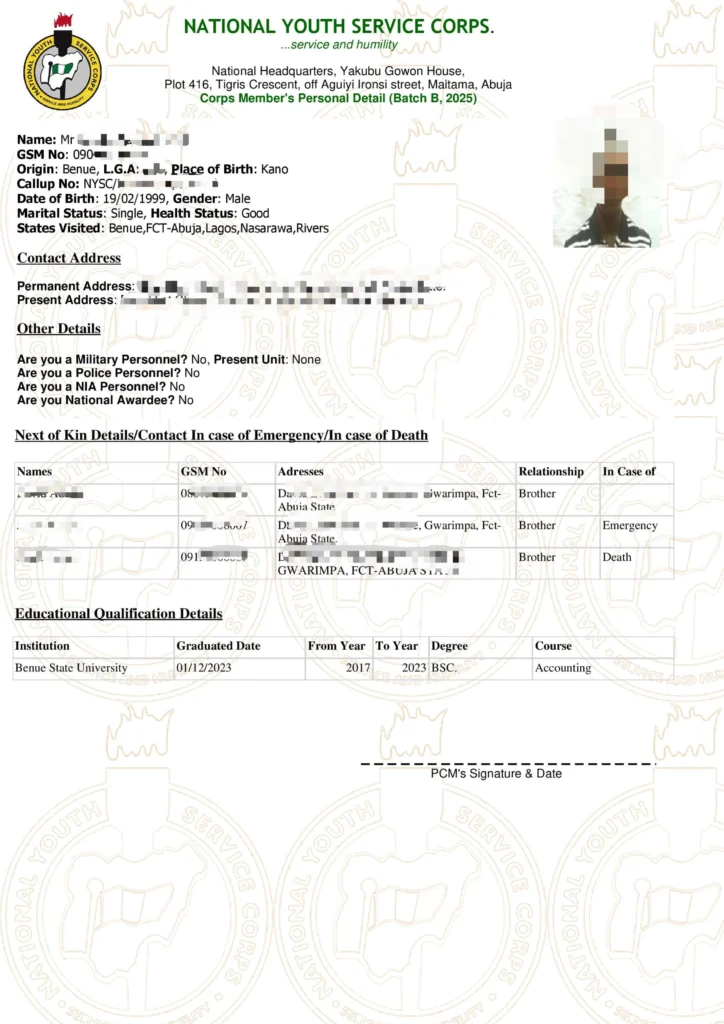
The NYSC Green Card is the registration slip generated after you successfully complete online registration and payment. It serves as proof that:
- Your registration was successful
- Your details have been captured by NYSC
- You are eligible to proceed to the next stage of mobilization
Despite the name, the document is not green. It is printed on plain white A4 paper. The term “Green Card” is simply NYSC’s internal name for the slip.
Without it, you cannot complete camp registration.
What the NYSC Green Card Contains
When you open your Green Card, you will see the personal information you submitted during registration. This includes:
- Full name
- Date of birth
- Call up number
- Course of study and institution
- Contact address and phone number
- Next of kin details
- Blood group and genotype
- Date of graduation
- Kit sizes for shoes, shirts, and shorts
- Passport photograph
The format is the same for everyone, but the details are unique to you.
Do You Need the Green Card at Camp?
Yes, it is compulsory.
Camp officials will request your Green Card during documentation. If you arrive without it, you will need to print another copy at a cybercafe outside or inside camp, which may cost you time and extra money.
To stay safe:
- Print the original in colour
- Make at least two photocopies
- Save a digital copy on your phone and email
Preparation prevents unnecessary stress at the camp gate.
How to Print the NYSC Green Card
Printing your Green Card takes just a few minutes if everything is in order.
Step 1: Confirm Your Registration Is Complete
Before printing, ensure that:
- Your name is on the senate list
- You completed online registration
- Your Remita payment was successful
- Your call up number is visible on your dashboard
Without these, the Green Card will not appear.
Step 2: Log in to the NYSC Portal
Sign in to your dashboard using your registered email and password.
Click on “Print Slip” just above your passport photograph. The Green Card will open in a new tab.
Step 3: Download as PDF
Check that all your details are correct. Then download and save the document as a PDF file. It is wise to back it up in your email for future access.
Step 4: Print Copies
Print the original in colour on A4 paper. Then make at least two black and white photocopies for camp documentation.
When Will the Green Card Be Available?
The Green Card usually becomes available a few hours after payment confirmation. For some people, it may take a few days.
Common reasons for delay include:
- Payment not yet confirmed
- Portal congestion during peak registration
- Call up number not yet released
If your registration and payment were successful, your Green Card will eventually appear. Patience is important.
Green Card vs Call Up Letter
Many PCMs confuse these two documents, but they serve different purposes.
NYSC Green Card
- Confirms successful registration
- Contains your personal biodata
- Includes your call up number
- Has no posting instructions
NYSC Call Up Letter
- Shows your state of deployment
- Contains camp address
- Includes your reporting date
- Provides travel instructions
In simple terms, the Green Card confirms registration, while the call up letter tells you where and when to report.
You must print and take both to camp.
Fixing Errors on Your Green Card
Mistakes on your Green Card should not be ignored. Some are minor, while others require urgent correction.
Minor Issues
- Incorrect kit sizes
- School start and end year
These do not affect your service and can be ignored.
Major Issues
- Wrong date of graduation
- Incorrect name
- Wrong course of study
- Date of birth errors
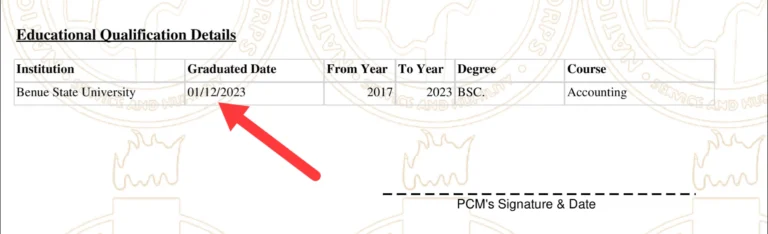
The date of graduation must match your statement of result. If it does not, contact your Student Affairs Officer immediately.
For date of birth correction, NYSC may allow verification through WAEC PIN. However, NYSC typically relies on the date of birth from your JAMB record, which is managed by the Joint Admissions and Matriculation Board.
Handle serious errors early. Do not wait until you arrive at camp.
What If Your Green Card Does Not Appear?
Try these steps:
- Confirm your payment status
- Log out and log back in after some time
- Clear your browser cache
- Use a laptop instead of a phone
- Try a different browser
If the problem continues, contact NYSC support or your institution.
What About the NYSC Addendum?
After printing your Green Card, you will see a pop up notification called the addendum. This document lists required camp documents and safety guidelines.
Unlike the Green Card, the addendum must be printed using a laptop or desktop. You must sign it and take it to camp as well.
Final Checklist Before Camp
Before traveling, make sure you:
- Printed your NYSC Green Card in colour
- Made at least two photocopies
- Printed your call up letter
- Saved digital backups
- Corrected any major errors
- Packed all required documents
The NYSC Green Card may look like a simple sheet of paper, but it carries significant weight throughout your service year. Keep it safe, review it carefully, and prepare properly.
Once everything is sorted, you can head to camp confident and ready for the next chapter of your service journey.